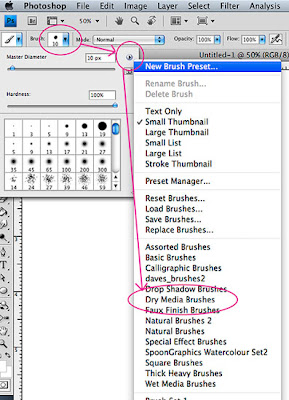
 When you're using Brushes in Photoshop, there are two different sets of controls that you should be aware of: the Brush Presets and the Brush Panel. The screen shot above is the Brush Presets. You can use this menu to access a bunch of different Brush libraries (like Dry Media Brushes or the Rubber Ducky Brush under Special Effects). You can also access this menu by right-clicking with the Paint Brush as the active tool (then hit the top right hand corner fly-out menu arrow) or through the Brush Panel.
 I scanned a drawing that I had done with a Micron pen and decided to paint it digitally (using Photoshop and Painter) for this week's Illustration Friday. Click on the image for a larger view.
 This is a study that I recently did to try out some different effects in Photoshop and tools in Painter (with a scanned ink line).
 Ink, watercolor in a Moleskine book
 This is based on the proverb "The bird who wiggles his toes like a worm gets the fish." Never heard that one? That's cuz' I just made it up. I did this watercolor in my Moleskine book during a beach trip. Apparently, some egrets do wiggle their toes to attract fish, so feel free to use my proverb (just give me credit).
 "The elephant ran ahead ..."
Yep, I admit it: I just wanted to paint an elephant.
Done in ink and acrylic.


